
If you've already received your Google+ invitation and are an active user of this great social network, then you've probably noticed how tedious and complicated it can be to share your profile with your friends. I mean this because your profile URL is quite long, with so many numbers and letters that it doesn't look very appealing. So today I'm going to recommend two web tools that will allow you to customize your profile URL and easily share it with your contacts.
Gplus.to :

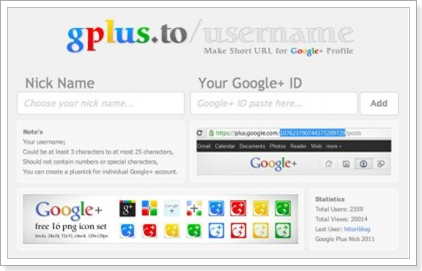
It is a free and fast service, without the need for registration, where you must enter your "Google+ ID". What is it ?: The site shows us a graphic example, it is the series of numbers in your profile. Then you paste this series and then you must enter your username or Nick (nickname) with which you want to be contacted. Finally you click on the 'Add' button and you will have already created an abbreviation of your profile.
The result will look something like this: http://gplus.to/marcelocamacho
Additionally, the site offers us the free download of a pack of 16 Google+ icons, in PNG format; a Plus for Google Plus.
Toplus :

A service very similar to the previous one, without advertising, or information, or statistics, dedicated exclusively to making your long and boring G + URL into a short and memorable one, as its slogan describes it well. Here the process is identical, you paste your Google ID and enter your username, simple and fast.
Your new sharing profile will have a structure similar to: http://topl.us/marcelocamacho
Which one do you think is better? Only you will decide, I personally tell you that you used the first one, it seems simpler to remember both for the one who shares and for the receiver.