
How to install Minecraft Forge and download mods
Minecraft is famous for the number of mods it has and how easy they are to install. These mods can be useful, for example, to create a new item.
Or add fun themed elements to the game, like new game modes. To install these mods, you need to use a free plugin called Minecraft Forge. This will allow you to customize Minecraft: Java Edition with mods.
Quick tip : Minecraft Forge cannot be used to add mods to Minecraft: Bedrock Edition. You will need to play the Java version.
Here's how to install Minecraft Forge and use it to install mods.
How to Download Minecraft Forge
1. Go to the Minecraft Forge download page.
Quick tip : Minecraft Forge requires Java, so install it before starting the download.
2. You will see two download links: the latest version and the recommended version. Choose the recommended one as it has fewer errors. Use the diagram in the Minecraft Version section on the left to ensure that you are downloading a version of Forge that matches your current version of Minecraft and any installed mods.

Go to the recommended download to avoid possible crashes in the latest version.
3. After clicking on the installer link, you will be shown an advertisement. Wait a few seconds, and then click Skip in the top right corner. Once pressed, the download will start.

Click Skip if you see a download screen with ads when Minecraft Forge loads.
4. Open the Forge installer and give the app the necessary access and privacy permissions when prompted. If you're using a Mac, you may need to go to your computer's security and privacy settings to give the app permission to open.
5. In the window that appears, select Install Client and click OK.

Click OK after accepting the client installation.
6. Forge will connect to the Internet and download all of your data. After this, a pop-up message will appear saying that Minecraft Forge has been installed successfully. Click OK to continue.

Forge, and its version number as seen in the Minecraft Launcher after installation.
7. Open the Minecraft Launcher.
8. Open the dropdown menu next to Play, which allows you to select the version of Minecraft you want to open.
9. In the options that appear, click and select Forge.

Click on the Forge icon in the lower left corner of the launcher.
10. Now click on the Play button.
Quick Tip: A pop-up message may appear asking you to accept that this version has been modified and may not be compatible with the latest security features of the player. This is a standard situation and you should approve it.
11. After loading the game, check if the Mods option appears. This means that you have successfully installed Minecraft Forge.

Click Mods to open the Mods menu.
How to add a mod to minecraft
Forge doesn't come with built-in mods, so you'll have to search for them yourself. You can find all kinds of mods for Minecraft through Google and sites like minecraftmods.

There are thousands of mods for the game «Minecraft», and new ones are added every day. minecraftmods.
Once you've found one, save the file to your Forge mods folder.
-
- The address on your computer will be C:NUsers.[ваше имя пользователя]AppDataRoaming.minecraft.mods
-
- On a Mac it will be: [имя вашего компьютера] > Macintosh HD > Users > [ваше имя пользователя] > Library > Application Support > minecraft > mods
Instead of [ваше имя пользователя] enter the name of the account you are using on your computer.
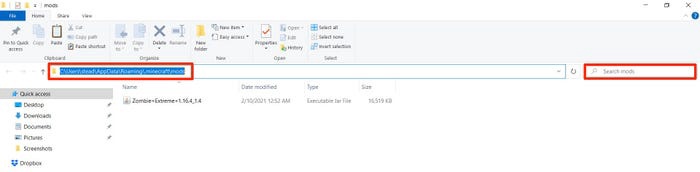
You can find “Mods” if you are having trouble finding the Minecraft Mods folder.
You can then check that the mod is enabled by going to the “Mods” tab in the Minecraft main menu (see above), and then making sure the mod is listed in the left column under the version of Minecraft you are running. .
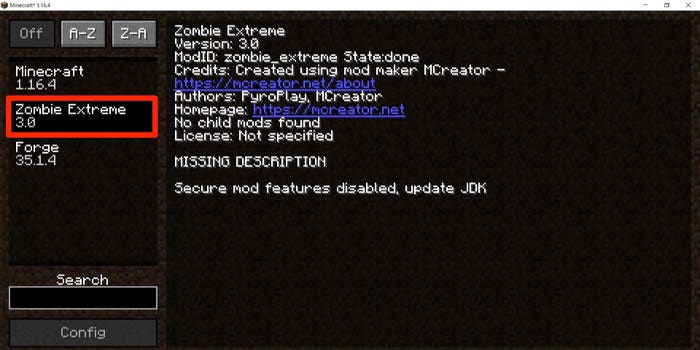
Zombie Extreme mod offers you “Minecraft” but with very powerful zombies.
For more information on installing mods, as well as a guide on how to install resource/texture packs (another type of mod), see our article “How to install Minecraft mods and resource packs to completely change your game”.
Quick tip : As with any installation, you may need to restart your computer before the mod changes take effect.
Table of Contents